An llms.txt file is a plain markdown file placed at yoursite.com/llms.txt that summarizes your site for AI models in a curated, link-based format. Write an H1 title, a one-line summary, then H2 sections listing your most important pages with short descriptions. No major AI platform has confirmed it actually uses the file yet, so treat it as low-risk hygiene, not a guaranteed visibility boost.

Type yoursite.com/robots.txt into a browser right now and you'll get a file. Type yoursite.com/llms.txt and on most sites, you'll get a 404. That gap is what this guide fixes, and it takes about twenty minutes if you keep the file focused.
Before you spend that twenty minutes, it's worth knowing exactly what this file does and doesn't do, because a lot of the content written about it oversells the payoff. This is a step-by-step guide to writing one correctly, plus an honest look at whether it's actually worth your time right now.
What Is an llms.txt File and Do You Actually Need One?
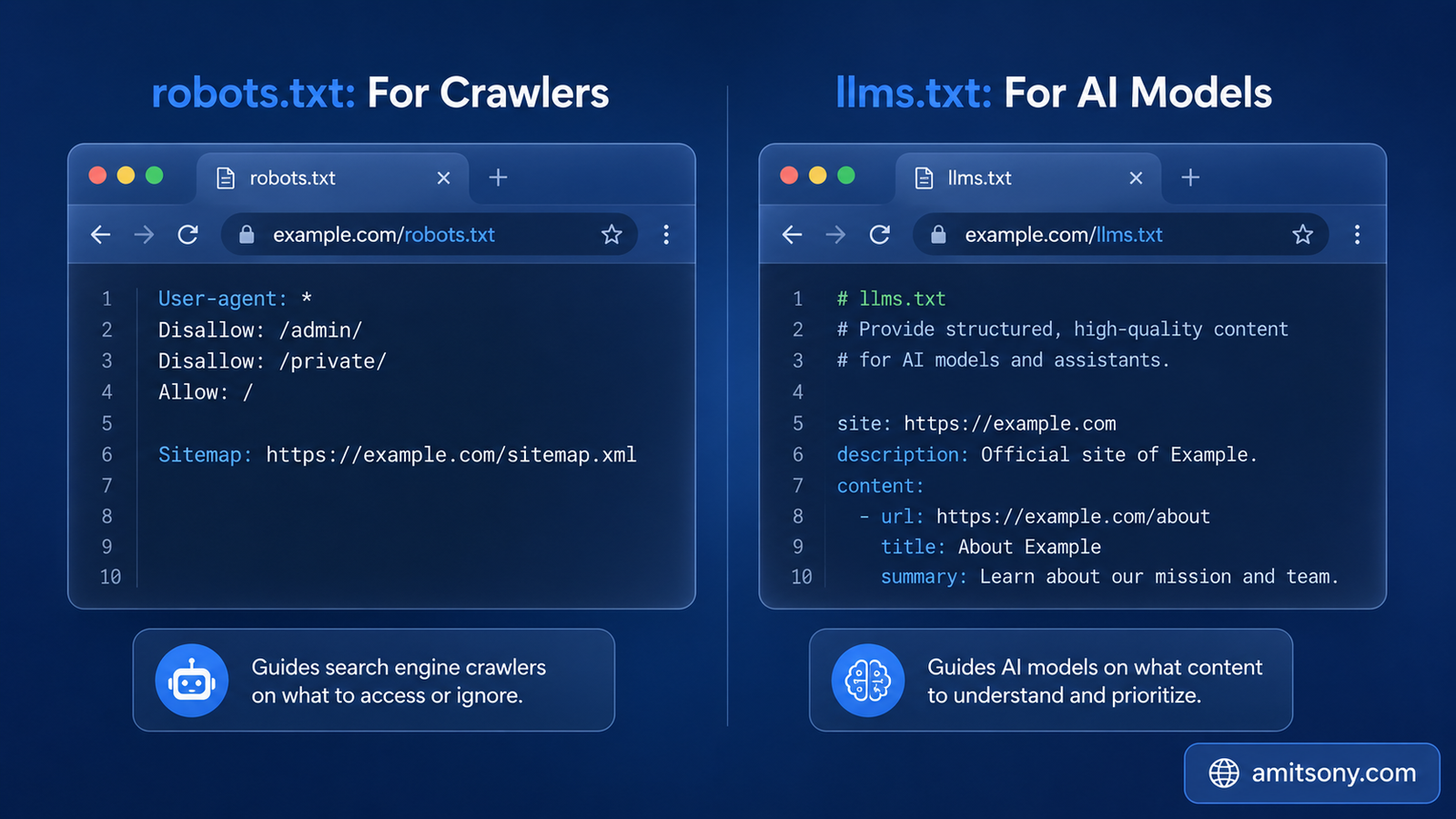
The llms.txt standard was proposed by Jeremy Howard as a lightweight way to give AI models a clean, structured overview of a website at the moment they're trying to answer a question about it. Think of it as a curated index, not a dump of your entire site.
The problem it's trying to solve is real. An AI model can't ingest your whole website in one pass, HTML pages are cluttered with navigation, ads, and scripts that make clean extraction genuinely hard, and without some kind of map, a model is left guessing which pages actually matter.
Here's the part most articles gloss over. As of mid-2026, no major AI platform has publicly confirmed that it reads or uses llms.txt files when answering questions. Google Search Central explicitly stated in May 2026 that llms.txt isn't necessary for its AI search surfaces. At the same time, Google added llms.txt as a check inside Chrome Lighthouse's new agentic browsing audit category that same month, which is a strange, slightly contradictory signal, being audited for without being confirmed as used.
Documentation-heavy sites with versioned content, API references, and frequently changing technical pages tend to get the most practical value from this file, since it gives a model canonical, stable links to point to. A small five-page marketing site has a much weaker case for spending real time on this.
What's the Correct Format for an llms.txt File?
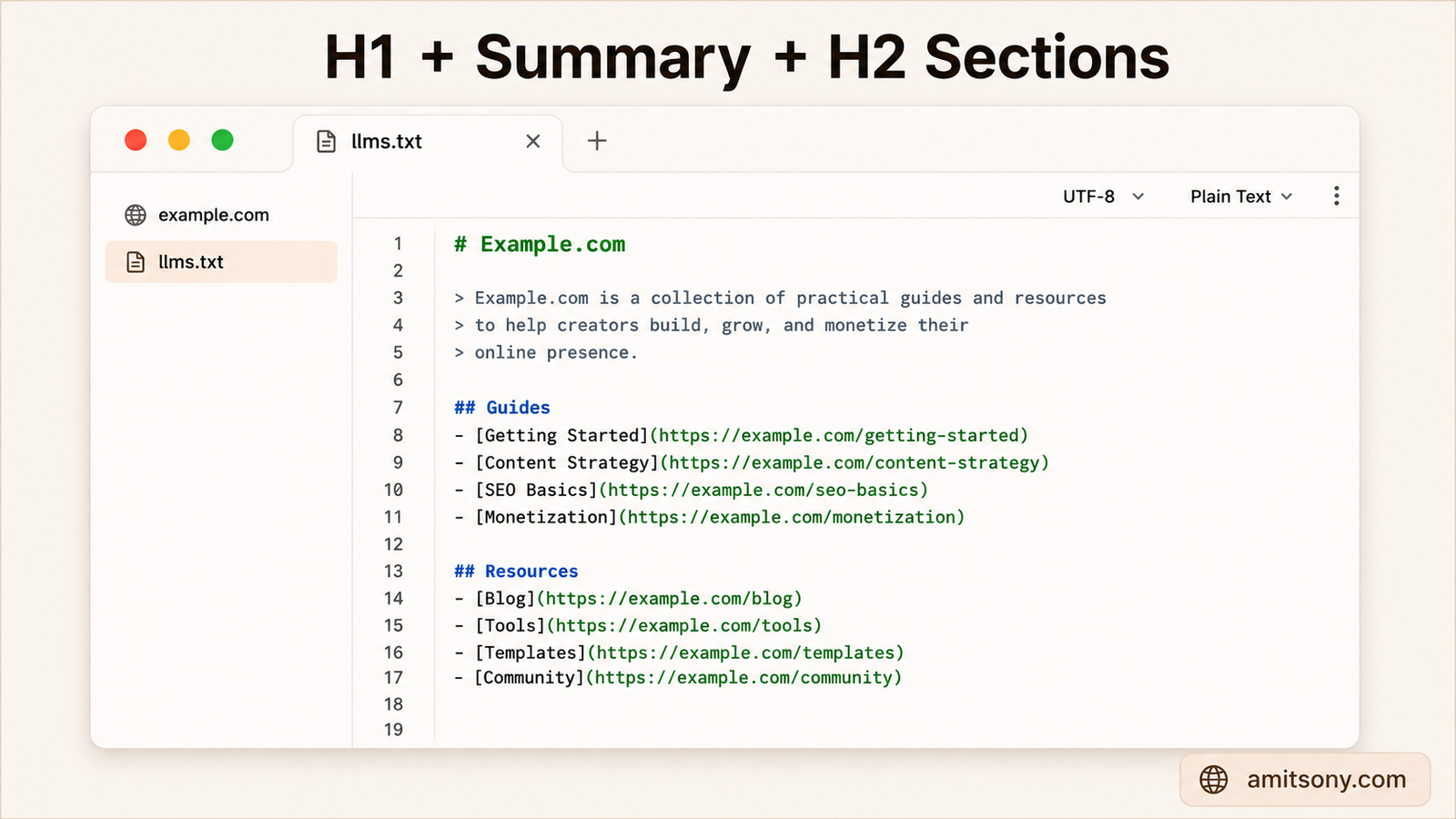
The spec is intentionally minimal, which is exactly why it's easy to get wrong in the other direction, by cramming in too much rather than too little.
Every file needs one H1 heading at the top, typically just your site or product name. Right below that, an optional blockquote gives a one or two sentence summary of what the site actually does, written the way you'd explain it to someone who's never heard of it.
Below the summary, H2 headings break your content into logical sections, things like Documentation, Guides, or API Reference. Under each H2, a simple bullet list links to your most important pages, with a short dash-separated description after each link so a model understands what it'll find there without having to open it.
There's no required link count or file size limit in the spec itself. That's not permission to list everything, it's permission to be selective. A curated dozen links beats an uncurated three hundred.
How Do You Write an llms.txt File Manually?
Open a plain text editor, not a word processor that might sneak in hidden formatting. Save a new file named exactly llms.txt, all lowercase, no spaces.
Start with your H1. A single line, a hash symbol, then your site name. Right below it, add a blockquote using a greater-than symbol followed by your one-line summary, something like "AcmeTools is a project management platform for small marketing teams."
Then build your H2 sections one at a time. Group related pages together, Getting Started, Core Features, Pricing and Plans, whatever structure actually matches how someone would look for information on your site. Under each heading, list your links using standard markdown link syntax followed by a short dash and description.
Skip anything that's purely for humans navigating visually, cookie banners, login pages, contact forms. This file exists to orient a model toward your actual substantive content, not to replicate your full site map.
If you'd rather not write markdown by hand, both ChatGPT and Claude can generate a properly formatted draft in seconds if you paste in a list of your key pages and ask for it structured to the llms.txt spec, with the required H1, an optional summary, and H2 link sections.
Which Free Tool Should You Use to Generate One Instead?
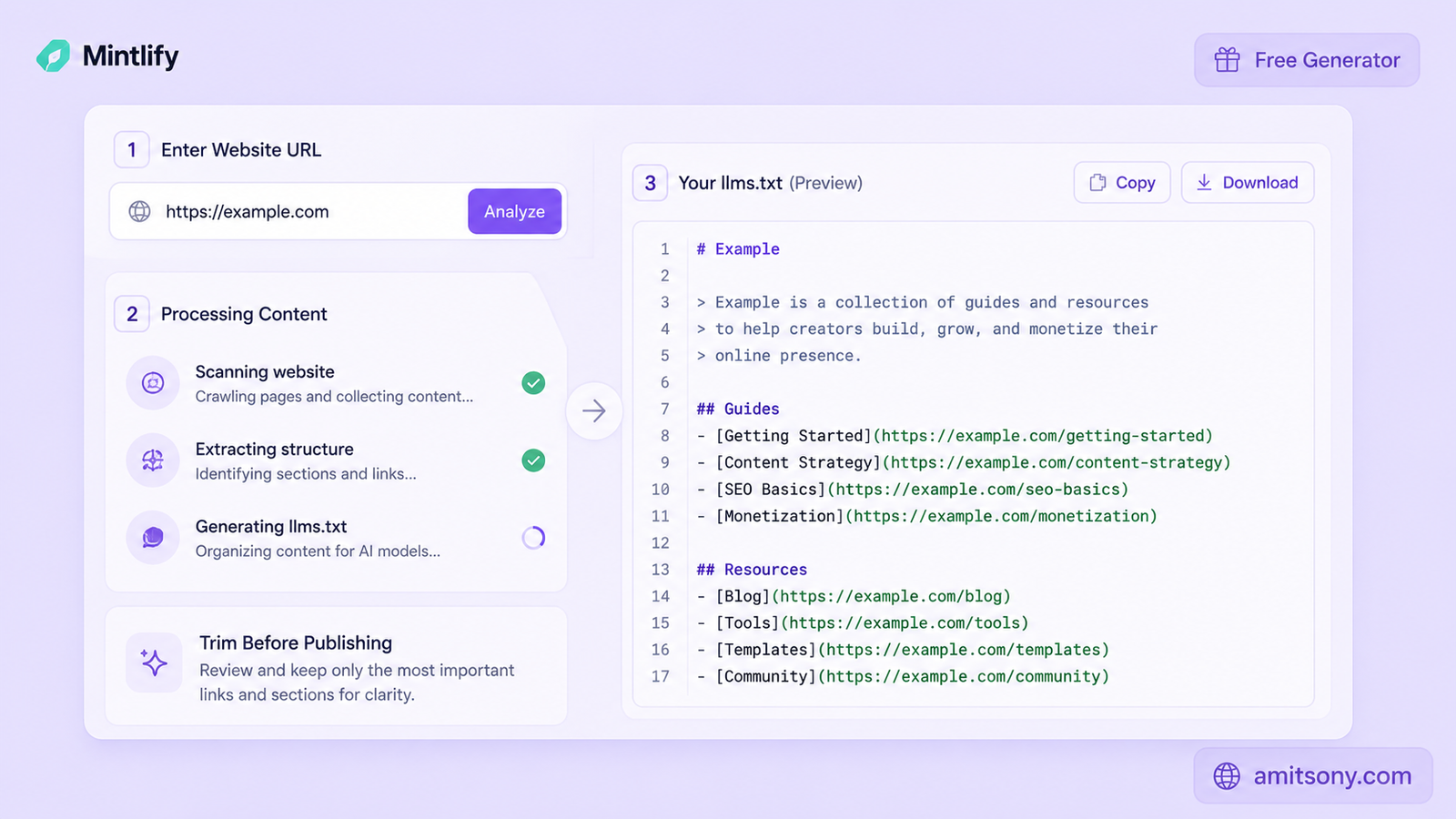
If your site has more than a handful of pages, a generator saves real time over writing everything by hand, as long as you're willing to trim what it produces.
Mintlify's free generator works well specifically for documentation sites. Paste in your docs URL and it produces a starter file based on your existing structure, which you then adjust, renaming sections and tightening descriptions to match your actual product.
Firecrawl's generator takes a broader approach, crawling a full site rather than just a docs structure, and producing both a standard llms.txt and a fuller llms-full.txt version with more inlined content. It's free to use, no signup required for a basic run.
Here's the honest catch with generators generally. Several auto-generators just crawl your entire sitemap and dump every blog post, category page, and legal disclaimer into one file. That defeats the entire point of curation, and a 5,000-line llms.txt is arguably worse than having none at all. Whatever tool you use, plan to manually cut the output down by 30% to 70% before publishing it.
Where Do You Actually Upload the File?
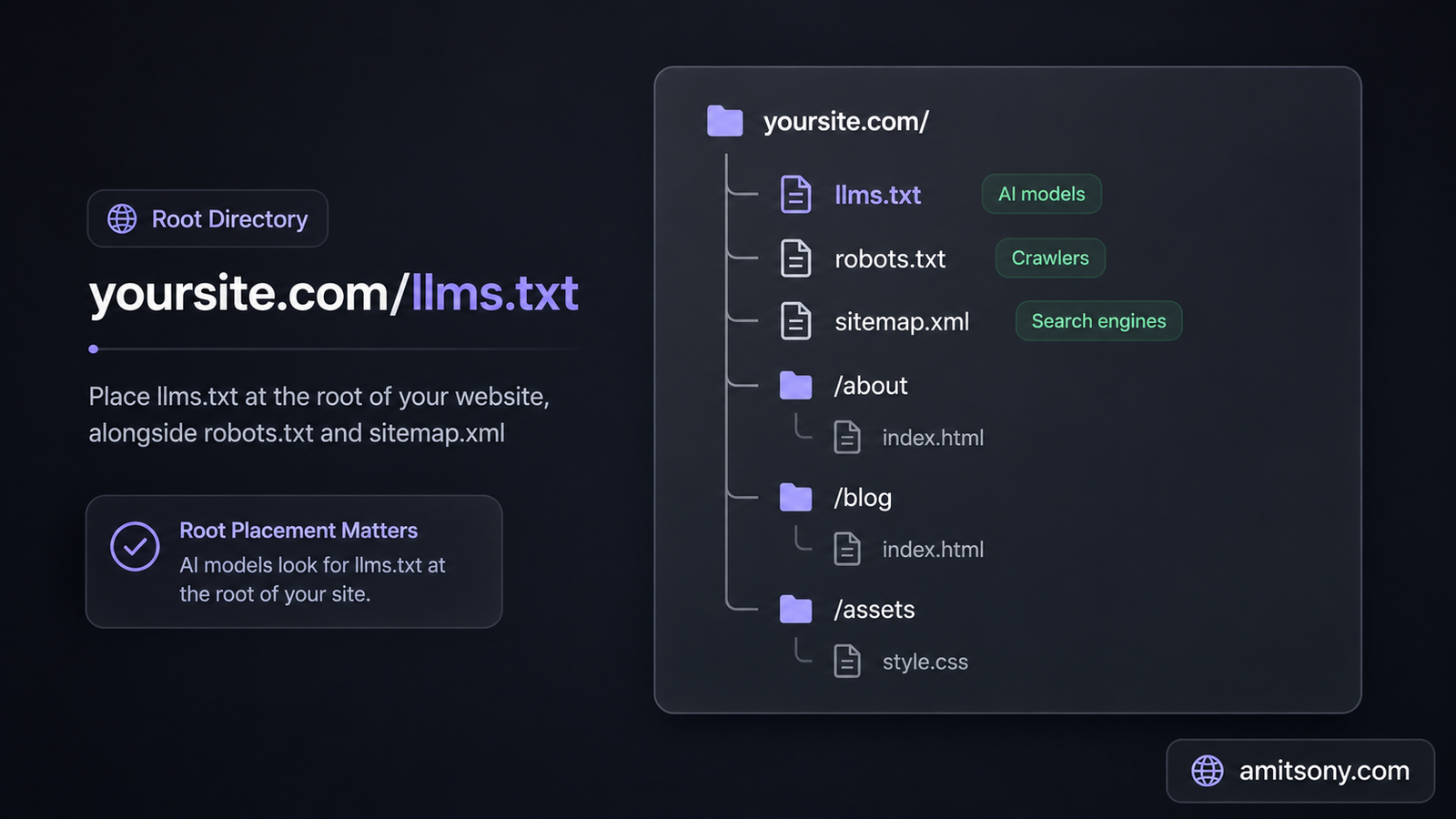
The file has to live at your domain's root, not inside a subfolder. The correct address is always yoursite.com/llms.txt, exactly parallel to how robots.txt and sitemap.xml already work.
For most hosting setups, this means uploading to your public root directory, commonly named public_html, public, or www depending on your host. If you're on WordPress, several SEO plugins, Yoast among them, now include a one-click llms.txt generator and upload step built directly into the plugin.
Once it's live, check it the same way you'd check robots.txt. Type the full URL directly into a browser and confirm the plain text file loads instead of a 404 page or your site's normal design template wrapping around it.
Does llms.txt Actually Improve Your AI Visibility?
Be skeptical of anyone promising a direct ranking or citation boost from this file alone. There's currently no public, controlled evidence that publishing an llms.txt file measurably increases how often AI tools cite your content, and platform support for reading it at all remains undocumented and inconsistent.
The comparison to robots.txt gets used a lot to justify getting ahead of the curve, robots.txt was once optional too, and now it's essential. That's a reasonable bet on where things are heading, but it's a bet, not a confirmed outcome, and you should treat it that way when deciding how much time to invest.
What actually matters more right now, and what you should fix first if you haven't: making sure AI crawlers aren't blocked in your robots.txt, and making sure your key content is server-rendered rather than hidden behind JavaScript that a crawler can't execute. An llms.txt file sitting on top of a site AI bots can't even properly crawl accomplishes nothing.
Realistic verdict: this is cheap, low-risk hygiene worth doing once your crawl access and rendering are already solid, not a priority project ahead of them.
What Mistakes Make an llms.txt File Useless?
Dumping your entire sitemap in is the single most common mistake. A file with three hundred uncurated links forces a model to guess what actually matters just as much as having no file at all, and it defeats the format's whole reason for existing.
Placing it in a subfolder instead of the root is a quiet failure mode, the file exists, it just never gets found because it's not where any tool expects to look for it.
Letting it go stale is the third big one. If you add major new sections to your site and never touch the llms.txt file again, it starts actively misrepresenting your site rather than helping describe it. Treat it like your sitemap, something you revisit periodically, not a one-time task you check off and forget.
Frequently Asked Questions
Do I need both llms.txt and llms-full.txt?
No, llms-full.txt is optional and inlines more complete content rather than just links. Most sites only need the standard curated llms.txt file.
Does ChatGPT or Google actually read llms.txt files?
There's no public confirmation that any major AI platform currently uses it, and Google has explicitly said it isn't necessary for its own AI search features.
Can I use a plugin to create llms.txt on WordPress?
Yes, several SEO plugins including Yoast now offer a one-click llms.txt generator built into the plugin.
How often should I update my llms.txt file?
Review it whenever you add major new sections to your site, similar to how you'd revisit a sitemap after a significant content update.
Is llms.txt the same thing as robots.txt?
No, robots.txt controls crawler access and permissions, while llms.txt is a curated content summary meant to help AI models understand what's on your site.