

A human in the loop AI agent pauses before risky actions and waits for a person to approve, edit or reject them. Classify tools by risk, gate only the dangerous ones, persist the paused state, and resume safely. Frameworks like LangGraph, the OpenAI Agents SDK and the Claude Agent SDK all support this.
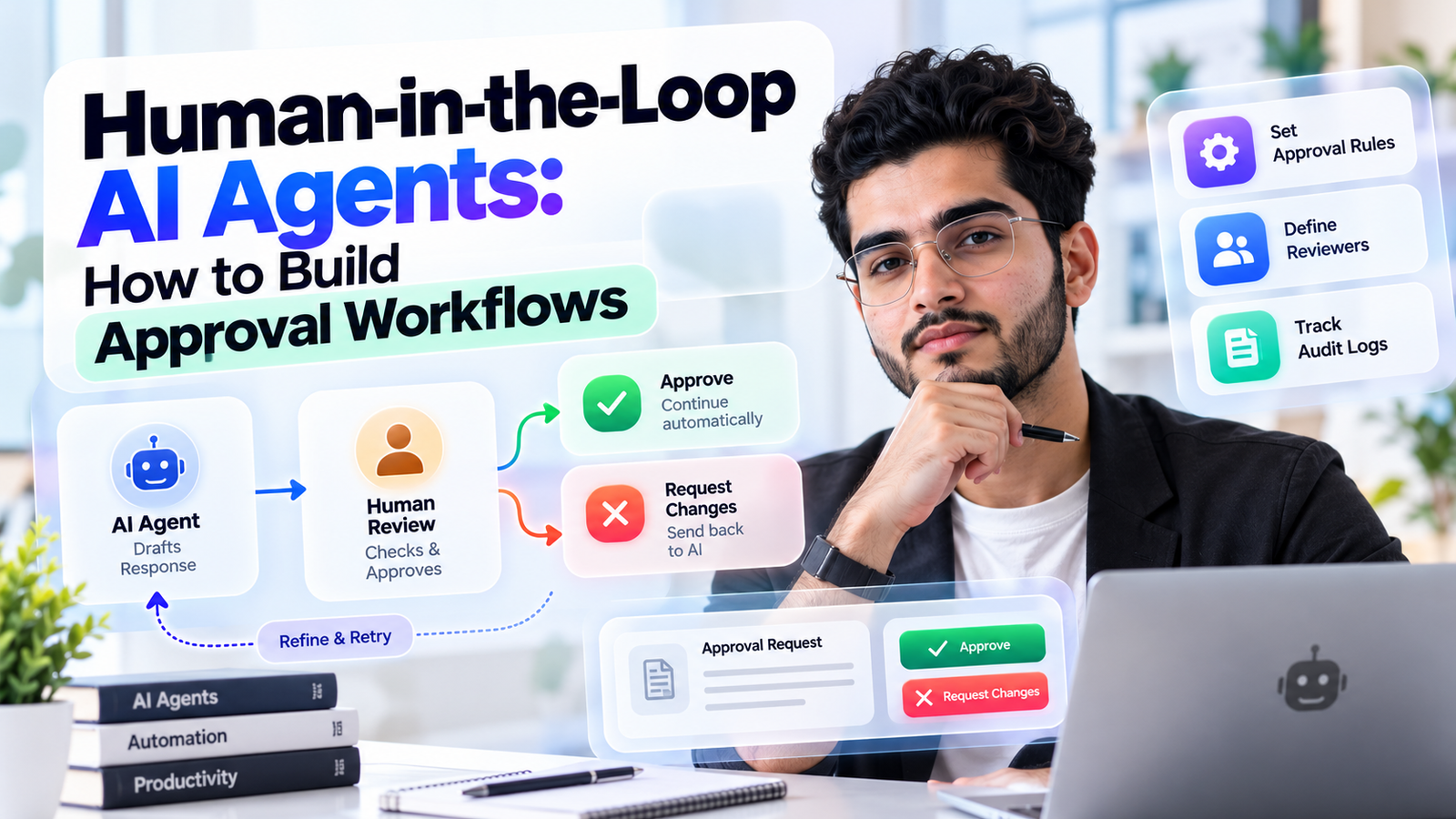
An agent that can send emails, issue refunds and run shell commands is useful right up to the moment it does the wrong one. Human approvals are the brake pedal.
This guide shows how to design them. You will see what to gate, how each major framework pauses and resumes, how to avoid approval fatigue, and what breaks once real users are involved.
What is a human in the loop AI agent?
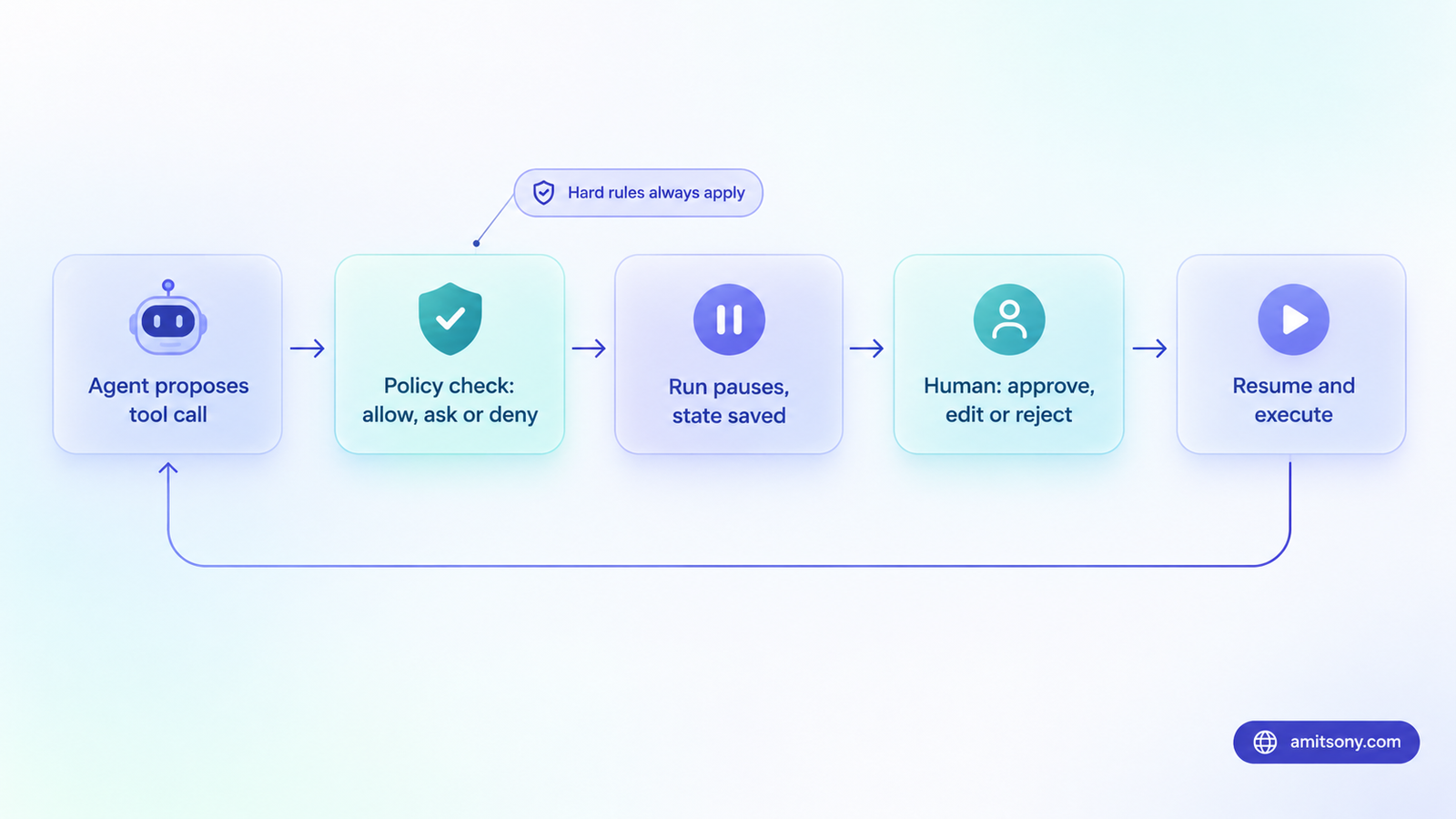
A human in the loop AI agent is one that cannot complete certain actions without a person's decision. The model proposes a tool call, the run stops, and a human approves it, edits it or rejects it with a reason the model can act on.
There are three common shapes. Approve or reject is the simplest. Edit then approve lets the reviewer fix an argument, such as a refund amount or email recipient. Ask for input lets the agent request missing information instead of guessing.
One caution before you build anything. Approval is a human check, not a policy engine. A person clicking approve does not replace hard rules such as spending limits, allowed domains or blocked commands. Use both: deterministic guards for what must never happen, and humans for what needs judgement.
Which agent actions should need human approval?
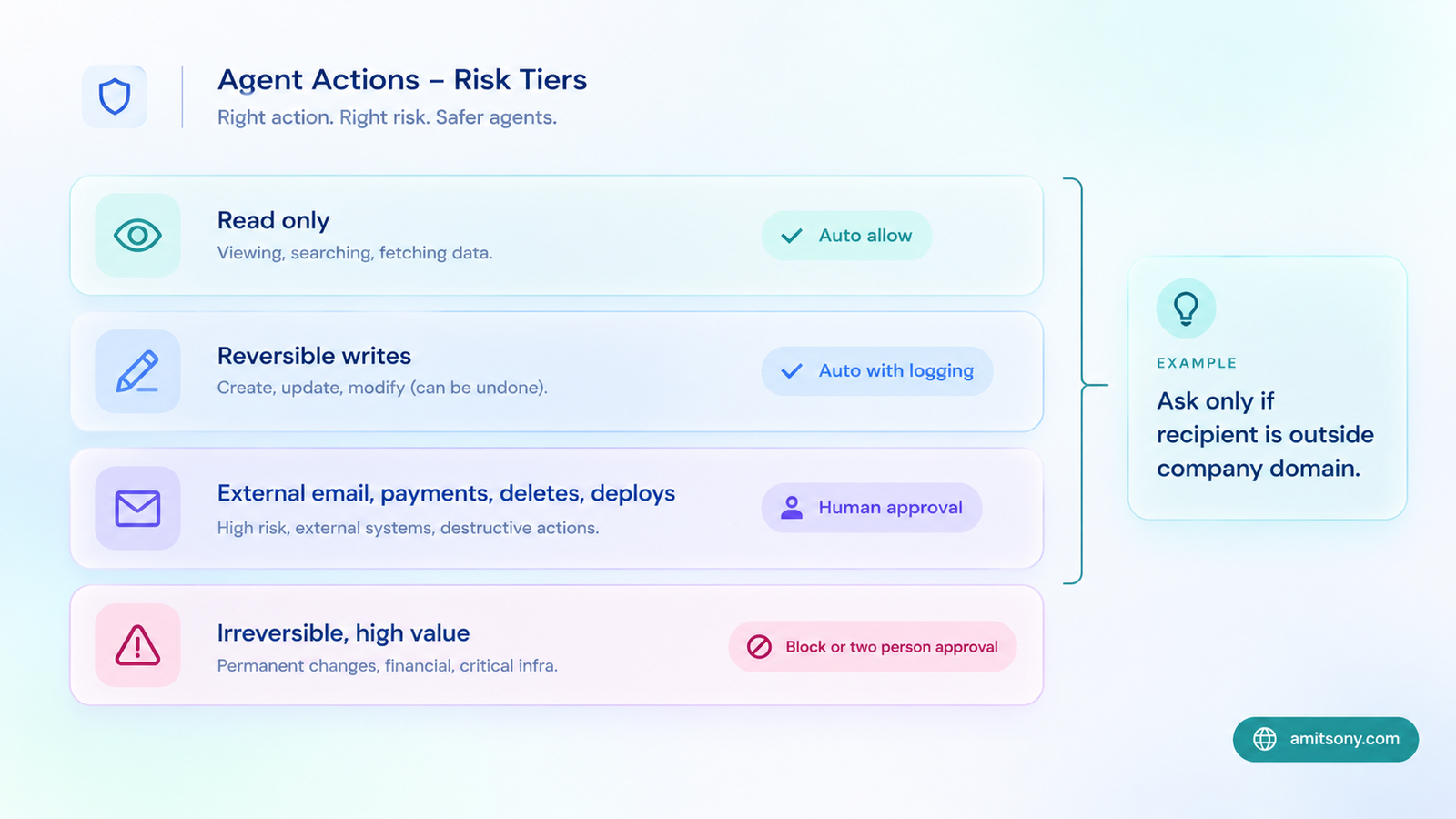
Approve by risk, not by tool name. The same send email tool can be harmless or dangerous depending on who receives it.
Read-only actions such as searching, reading files and fetching records should run automatically. Reversible writes, like drafting a document or adding a tag, can run automatically too, with logging.
Ask a human for external communication, money movement, deletions, permission changes and production deploys. Block outright anything irreversible and high value, or require two people.
Make the rule a function of the arguments, not a flat yes or no. The OpenAI Agents SDK lets a tool compute its approval rule from the parsed arguments, so you can ask only when an email goes outside your company domain. The same idea works anywhere. Ask above a refund threshold. Ask when a bulk update touches more than 50 records.
How do the main frameworks handle approvals?
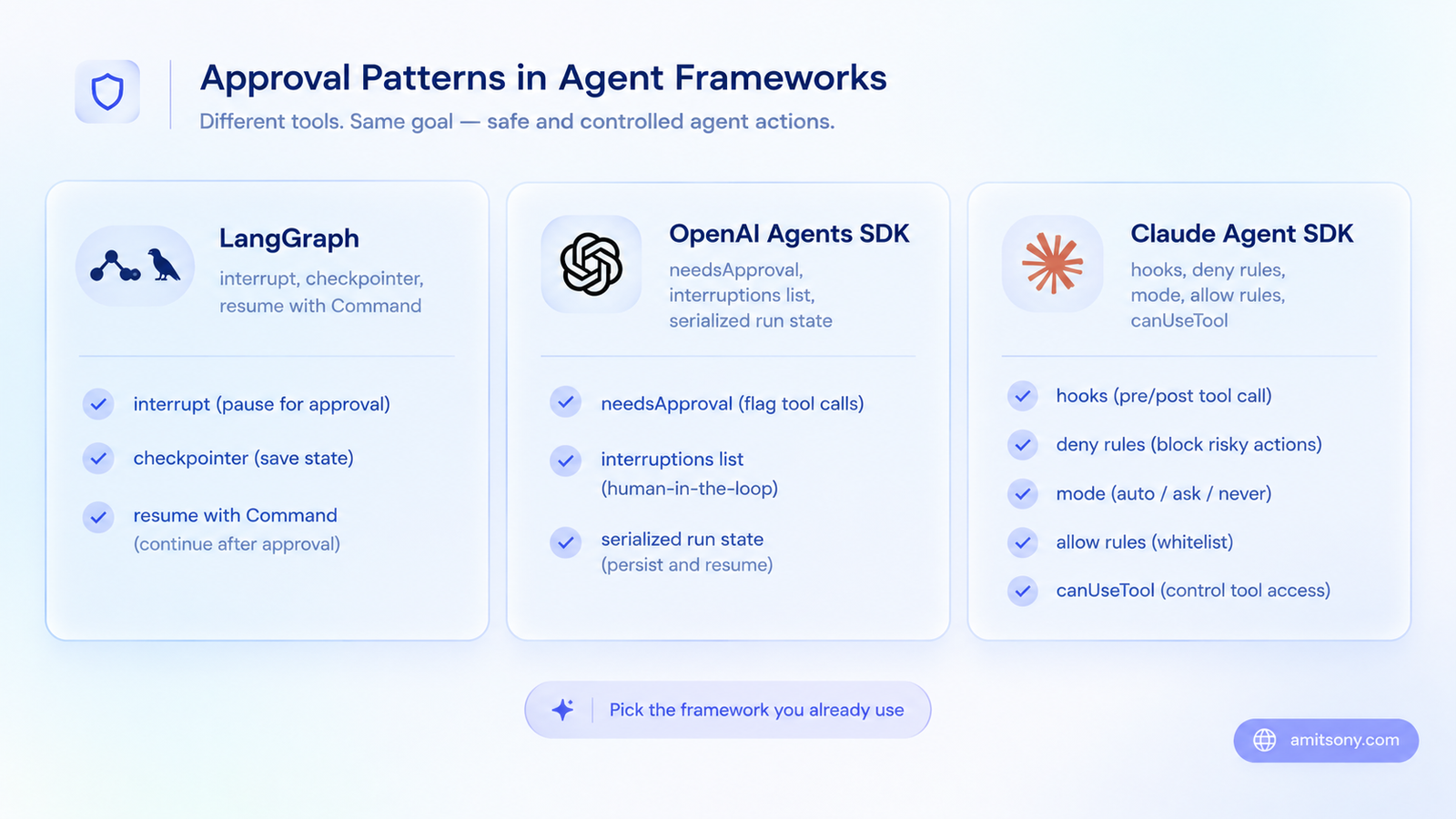
Each framework pauses in a different place, and the difference affects how you store state.
LangGraphlanggraph uses an interrupt function that can sit anywhere in a node. The graph state is saved by a checkpointer, and you resume by sending a Command with the human's answer. One gotcha: on resume, the node restarts from the beginning, so any side effect before the interrupt runs again. Keep those steps idempotent.
The OpenAI Agents SDK puts a needsApproval setting directly on the tool, either true or a function. When a call needs approval, the run pauses at the end of the turn and returns an interruptions list. You approve or reject on the serialized run state, then run again. Approvals raised inside nested agents bubble up to the same list. If approvals can sit for days, store a version marker with the saved state.
The Claude Agent SDKpermissions works inline. A tool request goes through hooks first, then deny rules, the permission mode, allow rules and finally a canUseTool callback, where your code asks the human. Modes include default, acceptEdits, plan, dontAsk, auto and bypassPermissions.
Two details matter in production. Deny rules still block actions in every mode, including bypassPermissions. And subagents inherit bypassPermissions, acceptEdits or auto from their parent and cannot override it. Keep bypassPermissions inside a sandbox, nowhere else.
Mastra offers requireApproval and the Vercel AI SDK offers needsApproval for the same job. Verdict: pick whichever framework you already use, and do not switch just for approvals.
How do you build an approval flow step by step?
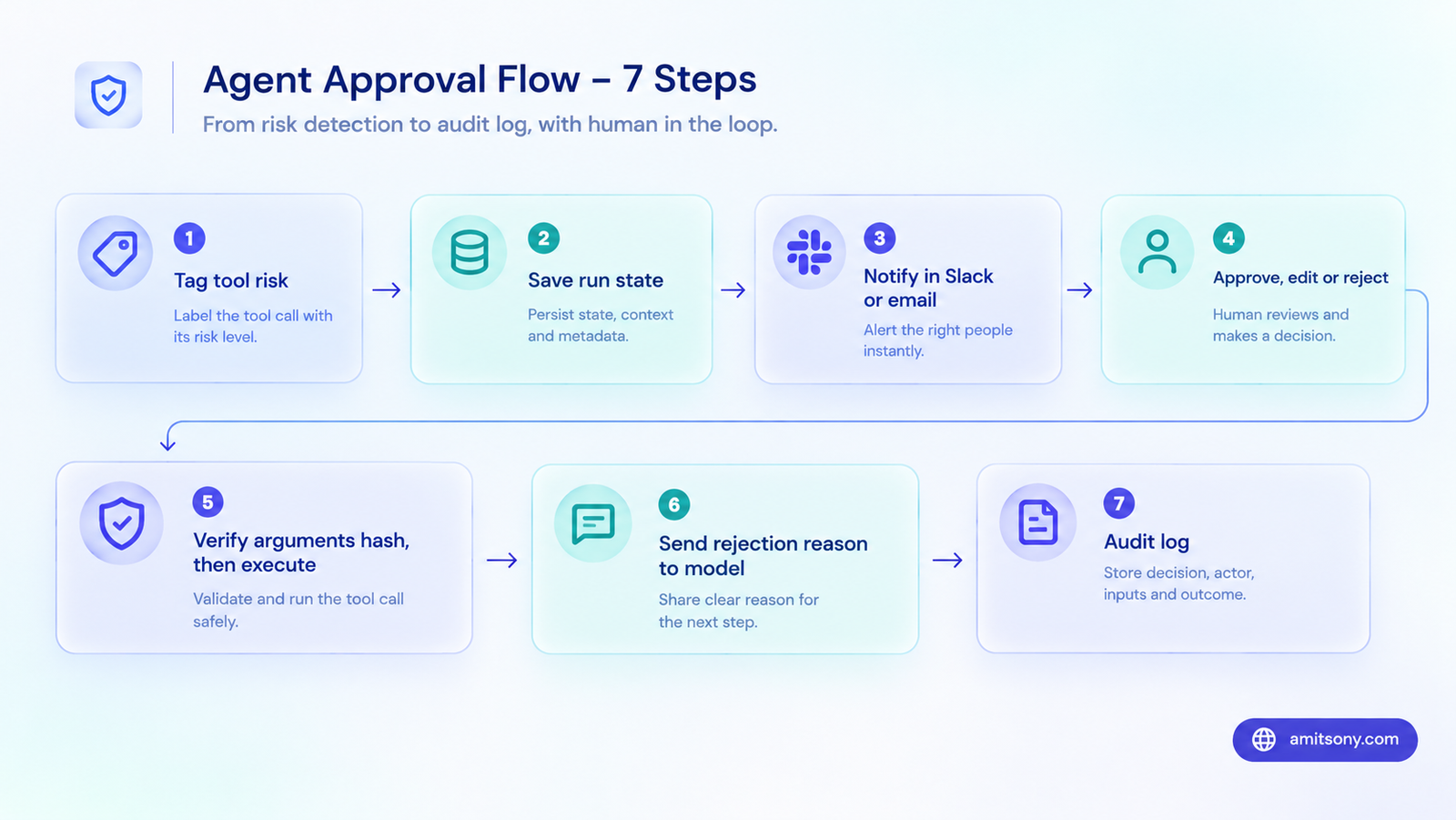
These steps work in any framework.
Step 1. Tag every tool with a risk level and write one policy function that returns allow, ask or deny for a given call.
Step 2. When the answer is ask, save the full run state in a database and create an approval record. Store an approval ID, the tool name, the exact arguments, who requested it, why, and an expiry time.
Step 3. Notify the reviewer where they already work, such as Slack, email or a dashboard. Show the raw arguments in plain language. Do not show only the model's own description of what it wants to do.
Step 4. Let the reviewer approve, edit the arguments or reject with a reason.
Step 5. On resume, check that the approval is still valid and has not been used before. Compare a hash of the arguments to what was approved, and re-run the policy check. Then execute with an idempotency key so a double click cannot fire the action twice.
Step 6. Feed a rejection reason back to the model so it can try a safer route.
Step 7. Log the whole chain, including who approved what and when. You will need it later.
How do you avoid approval fatigue?
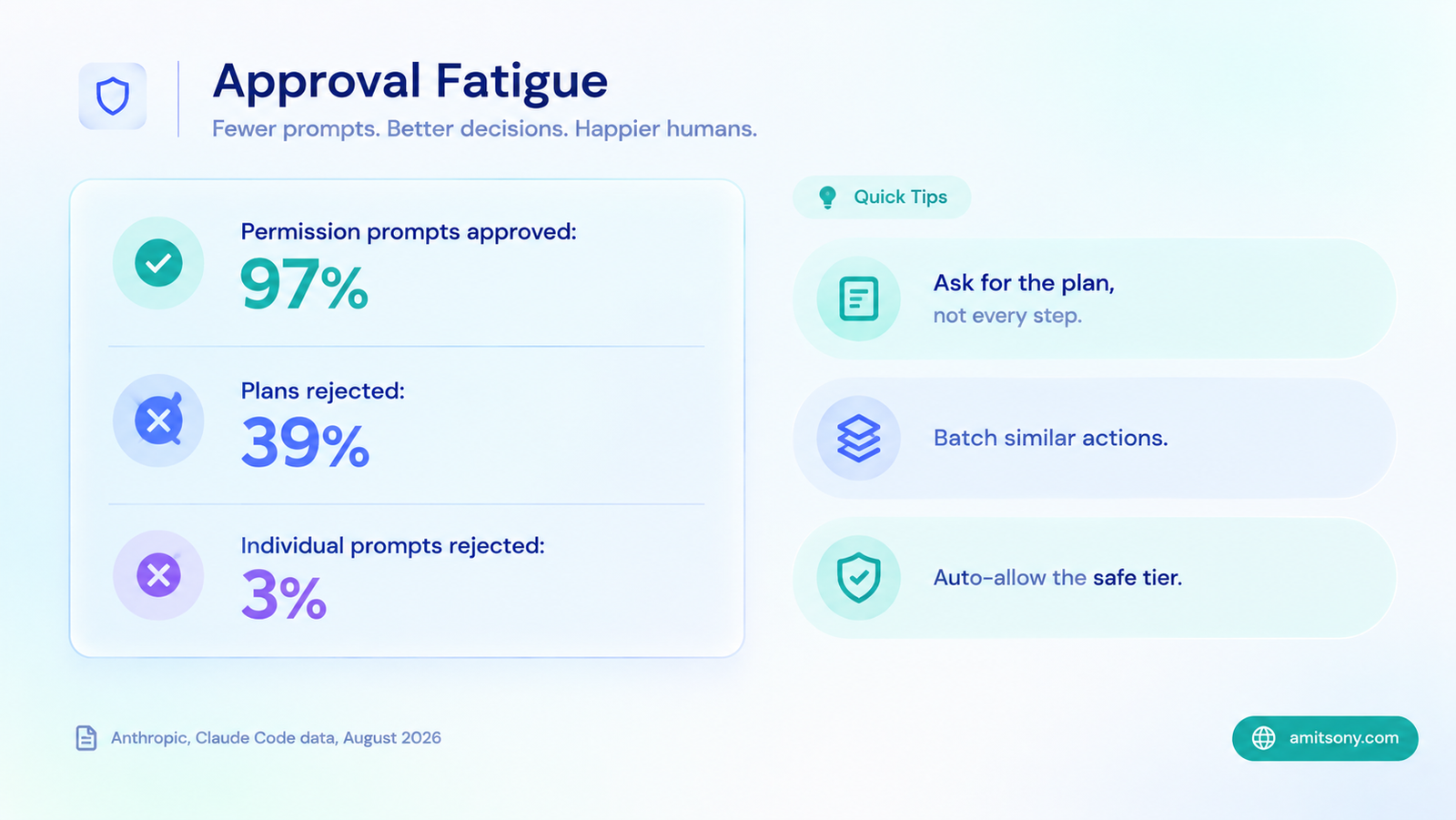
Approval fatigue is the quiet killer of human in the loop designs. Anthropic reported in August 2026 that Claude Code users approve 97 percent of permission prompts. An earlier Anthropic analysis in March put the figure at 93 percent. At that rate, a prompt is a click, not a review.
The same data holds the fix. Users rejected 39 percent of plans that Claude presented for approval, even though they rejected only 3 percent of individual permission prompts. People engage with a plan and ignore a stream of small questions.
So ask for fewer, bigger approvals. Have the agent present a plan, get one decision, then let it run inside deny rules and sandboxes. Batch similar actions into one request. Auto-allow the safe tier completely.
Track the approval rate for each tool. If a gated tool is approved 99 percent of the time, move it to auto with guardrails. A prompt nobody ever rejects is just a delay. If it is never approved, remove it.
A classifier can act as a second reviewer. The Claude Agent SDK has an auto mode that does this, and Anthropic made it the default in Claude Code for Pro, Max and Team plans from August 14. Reports say it falls back to manual approval after repeated blocks. It cuts clicks, but treat it as an extra layer, not a replacement for deny rules.
What breaks in production, and how do you fix it?
Reruns on resume. As noted, some frameworks restart the paused step from the beginning. Make everything before the pause safe to repeat.
Stale approvals. If your agent code changes while a request waits, the saved state may no longer match. Store a version marker and reject or migrate old approvals.
Waiting forever. Approvals that sit for days pile up. Give every request an expiry, default to deny, and escalate to a second person before it lapses. For long waits, a durable workflow engine such as Temporal with signals, or Inngest with its wait for event step, keeps the wait cheap and survives deploys.
Prompt injection. Content inside a web page or email can persuade the agent to request approval for a harmful action. This is why reviewers should see the raw arguments, not a friendly summary written by the model.
Double execution. A reviewer clicks twice, or a retry fires. Use idempotency keys on every side effect.
Inherited power. A subagent that quietly inherits an auto approving mode skips every check you built. Audit what each subagent inherits.
When can you safely reduce human approvals?
Think of autonomy as a ladder, and climb it one rung at a time.
Start with approval on every risky action. After a few weeks, move to approving the plan only. Then move to approving exceptions, meaning only the calls that break a rule. Finally, move to after-the-fact audit with sampling.
Climb only when the data supports it. You want a low rejection rate over a meaningful number of reviews, no incidents tied to that tool, and deny rules that cover the worst case.
Never remove the human from irreversible actions. Money, deletions and anything that touches customers should keep a person on the hook, however good the agent looks.
Frequently Asked Questions
What is human in the loop in AI agents?
It means the agent pauses before certain actions and waits for a person to approve, edit or reject them.
Which framework is best for human in the loop AI agent workflows?
LangGraph and the OpenAI Agents SDK are the common choices for resumable approval flows, and the Claude Agent SDK suits inline permission checks. Use the one you already build with.
What is approval fatigue?
It is when reviewers approve prompts without reading them because they see too many. Anthropic reported that users approve 97 percent of Claude Code permission prompts.
Is human approval enough to keep an agent safe?
No. Combine it with hard rules such as deny lists, spending limits and sandboxes. Humans handle judgement, rules handle what must never happen.
How long should an approval request stay open?
Set an expiry, usually minutes to a day depending on the task, and deny by default when it lapses.