

Claude Code wins on raw capability and autonomous multi-file tasks (80.8% SWE-bench Verified). Cursor wins on daily IDE experience and visual workflow. Copilot wins on price and GitHub integration at $10/month — though new individual plan sign-ups are currently paused. Most serious developers end up using two of these together, not just one.

The AI coding assistant race in 2026 is no longer about autocomplete. Claude Code, Cursor, and GitHub Copilot have all evolved into agentic systems that can read your entire codebase, plan multi-step changes, write and execute code across dozens of files, and ship pull requests — sometimes without you touching the keyboard at all. The gap between them is no longer about which one suggests better one-liners. It is about workflow philosophy, autonomy depth, context size, and how much you trust the agent to run unsupervised.
The problem is that every comparison article tends to crown a single winner. The reality developers are actually living in 2026 is messier and more interesting: most professional engineers run two of these tools simultaneously, with each one handling a different category of work. This guide breaks down exactly what each tool is, where it genuinely excels, what it costs, and — crucially — who should pick what. Real benchmark numbers, current pricing, no fluff.
What Is Each Tool Actually Doing Under the Hood?
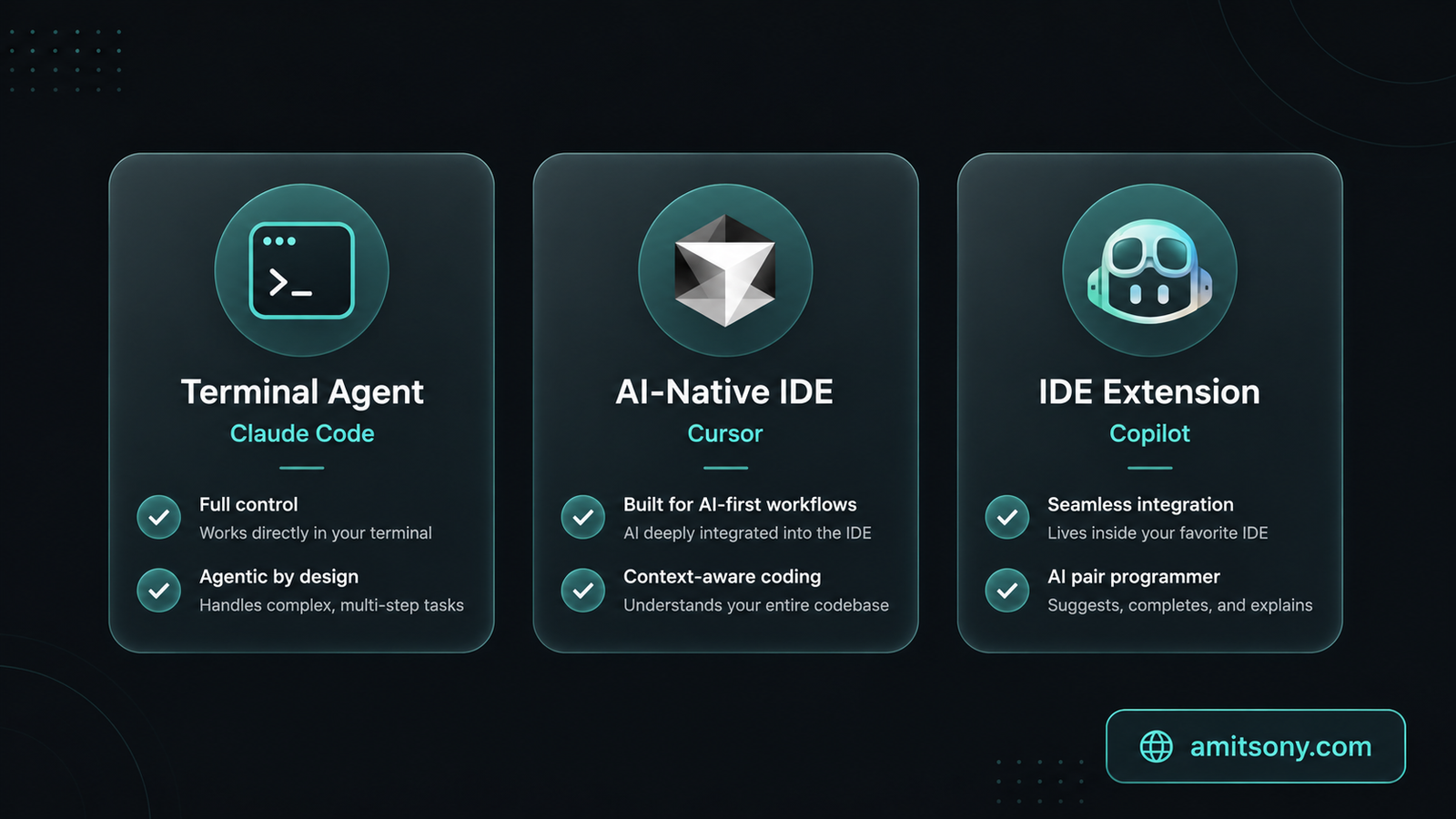
Before comparing features, it helps to understand that these three tools are not competing versions of the same product. They represent three completely different philosophies about how AI should integrate into a developer's workflow.
Claude Code is a terminal-native agentic coding tool. It runs in your command line, connects to Anthropic's Claude model APIs, and operates as an autonomous agent that can read, write, and execute code across your entire project. It works with any editor, any language, and any development environment because it does not live inside an IDE at all. It sits one level below — in your terminal — giving it access to the full Unix toolchain, your CI pipelines, and shell scripting. This is what makes it uniquely capable for large-scale autonomous tasks.
Cursor is a standalone IDE — specifically a fork of VS Code — rebuilt from the ground up with AI integrated into every layer of the editing experience. Tab completions, inline chat, multi-file Composer sessions, background agents, and a plugin marketplace are all native, not bolted on. Because it controls the entire editing environment, Cursor delivers a tightly integrated visual experience: AI-suggested changes appear as diffs you can accept or reject inline, which makes the review loop fast and tactile. The trade-off is that you have to actually switch editors to use it.
GitHub Copilot is an IDE extension that works across VS Code, JetBrains, Visual Studio, Neovim, Xcode, and GitHub Mobile — essentially everywhere developers already live. It does not require switching tools. Agent mode, which converts GitHub issues into pull requests autonomously, is now generally available. Its billing model shifted significantly on June 1, 2026: GitHub replaced Premium Request Units with a token-based AI Credits system, keeping the headline plan prices the same but changing what those prices actually cover in practice.
How Do They Actually Compare on Benchmarks?
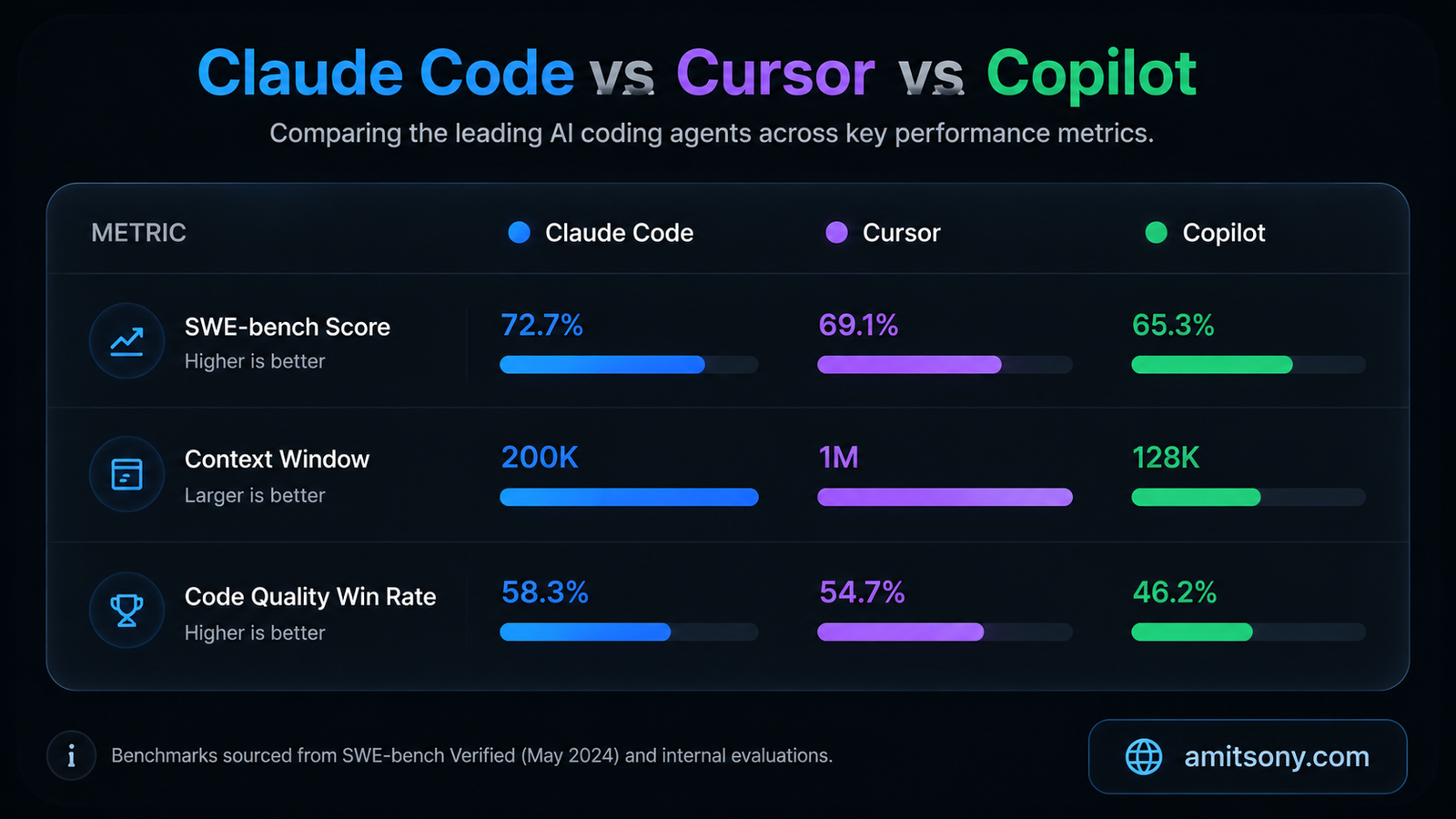
Raw benchmark data in 2026 tells a clear story at the top end, though it does not tell the whole story.
On SWE-bench Verified — the standard benchmark for real-world software engineering tasks — Claude Code scores 80.8%, which is the highest of the three. Cursor clocks in around 74%, and GitHub Copilot sits at approximately 56% depending on the model configuration in use. A blind code quality test across 36 identical tasks run by developer Blake Crosley found Claude Code winning 67% of head-to-heads against Cursor on code quality, correctness, and completeness. Cursor, however, performed faster on smaller, simpler tasks — and in real usage that matters too.
The context window difference is also significant. Claude Code supports a 1 million token context window that went generally available in March 2026, meaning it can ingest and reason about enormous codebases in a single session. Cursor's effective context is roughly 200,000 tokens. For day-to-day editing on a feature branch, that gap rarely matters. For a senior engineer doing a large-scale refactor or onboarding to a massive legacy codebase, it changes the nature of what is even possible.
Where Cursor genuinely wins on benchmarks is speed on everyday tasks. In a median output rate comparison, Claude Code delivered 90 tokens per second versus Cursor's 85 — but Cursor's inline diff UI and auto-apply feature meant the developer-facing loop was faster on simple tasks because the next action (reviewing the diff in the editor) was already staged. The takeaway: on hard problems, Claude Code has a measurable capability edge. On fast, interactive daily editing, Cursor's visual workflow closes much of that gap.
What Does Each Tool Cost in 2026?
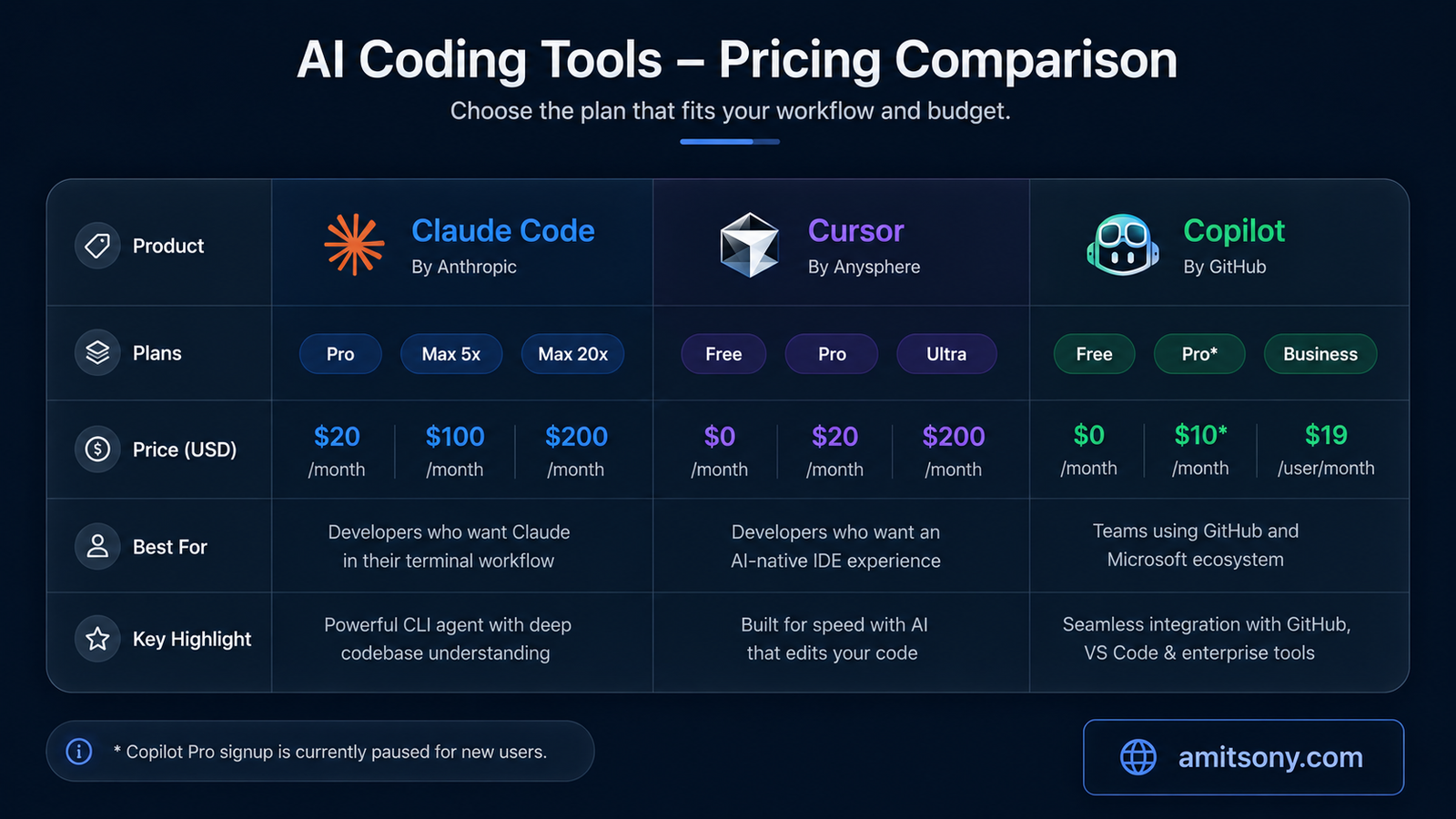
Pricing across all three tools has shifted meaningfully this year, and the sticker price is no longer the right comparison point. What matters is what the price actually buys you in terms of model access and usage caps.
Claude Code is not sold as a standalone product. It is included with Anthropic's Claude subscription plans. The cheapest entry point is Pro at $20/month ($17/month on annual billing), which includes Claude Code terminal access, Sonnet 4.6 and Opus 4.6 access, and roughly 44,000 tokens per 5-hour session window. The Max 5x plan at $100/month removes most of the friction for daily heavy usage. The Max 20x plan at $200/month is built for teams running intensive agentic workflows. There is no free tier for the terminal tool — the free Claude plan covers chat only, not terminal access. Anthropic did launch a Claude for Open Source program in February 2026, giving qualifying open-source maintainers six months of Max 20x access at no cost.
Cursor starts at Free with a genuinely useful tier: Supermaven autocomplete, 2,000 completions per month, and limited agent mode access. Cursor Pro at $20/month unlocks the full Composer multi-file editor, Agent mode without limits, and access to frontier models including Claude Opus 4.6. Cursor Ultra at $200/month gives heavy users 20x the usage across all frontier models. For teams, Cursor Business runs $40/user/month — which is notably more expensive than comparable GitHub plans. One practical note: Cursor moved to a credit-based model in June 2025, so the sticker price buys a monthly quota of premium requests rather than unlimited frontier model calls.
GitHub Copilot has a legitimate free tier: 2,000 code completions per month plus 50 agent mode and chat requests, with access to Claude Haiku 4.5 and GPT-5 mini. Pro was $10/month with unlimited completions and 300 premium model requests — but as of April 20, 2026, new signups for Pro, Pro+, and Student plans are temporarily paused while GitHub re-architects its billing system. Existing subscribers keep their plans. Copilot Business at $19/user/month and Enterprise at $39/user/month (which requires GitHub Enterprise Cloud at an additional $21/user) are both still accepting new teams. The June 1, 2026 switch to AI Credits billing means agent mode, chat, and code review now draw from a token pool rather than a flat request count.
Which Tool Wins for Agentic and Autonomous Work?
Agentic coding — where the AI plans, executes, tests, and iterates on a complex task without constant hand-holding — is the frontier that separates these tools most clearly in 2026.
Claude Code was designed from the ground up as an autonomous agent. It can chain shell commands, read dozens of files in parallel, spawn sub-agents that handle isolated sub-tasks and return summaries to the main session, and run headless in CI pipelines without any human in the loop. The ability to compose Claude Code with grep, sed, and other terminal utilities gives it capabilities that IDE-bound tools fundamentally cannot replicate. Starting June 15, 2026, Anthropic separated human-in-the-loop usage from autonomous usage on subscription plans — interactive sessions draw from session limits while headless agent runs draw from a separate Agent SDK credit pool. For teams that want to run overnight or CI-triggered agentic tasks, this is the right architecture.
Cursor's background agents are strong and have improved significantly. Cursor 2.5 (released February 2026) introduced async subagents that can spawn nested subagents, creating a tree of coordinated work. But Cursor's agents operate within the IDE context — they are excellent at visual, file-level work where a developer stays in the loop and reviews inline diffs. The tool is not designed for fully unsupervised long-horizon runs the way Claude Code is.
GitHub Copilot's coding agent — the feature that converts a GitHub issue into a pull request autonomously — is genuinely useful and deeply integrated with GitHub Actions and CI/CD. The multi-model assignment feature, which lets you assign Claude, Codex, and Copilot to the same issue simultaneously, is a creative and practical way to get diverse outputs. For teams running on GitHub infrastructure, this integration is hard to beat. But the agent still requires human review at the PR stage by design, which is the right call for most enterprise settings.
Which Tool Is Best for Daily IDE Coding?
If autonomous long-horizon tasks are Claude Code's domain, the daily coding grind — feature work, bug fixes, quick refactors, PR reviews — is where Cursor and Copilot compete most directly.
Cursor's strength here is undeniable. The Supermaven autocomplete has a 72% acceptance rate in testing, the inline diff UI is fast to review, and the Composer multi-file editor handles the kind of "change this pattern across 12 files" tasks that used to take 30 minutes in under 5. The autonomy slider, which lets you decide how much the agent does before pausing for input, is a genuinely useful UX concept that no other tool has matched cleanly. Developers who work in Cursor consistently describe it as the tool with the best "developer joy" — the editor feels fast, the AI feels integrated, and the visual feedback loop is satisfying.
Copilot's advantage is frictionlessness. If you work in JetBrains, Visual Studio, or Neovim, Cursor is simply not an option — it requires committing to the Cursor IDE entirely. Copilot works inside whatever editor you already love, which lowers the adoption barrier to near zero for large engineering teams. The inline completions are mature and accurate. Agent mode in VS Code has improved considerably. And the GitHub integration — where Copilot can see your issues, pull history, and CI status — creates a kind of contextual awareness that pure editor tools cannot replicate.
One important nuance for teams: Copilot Business at $19/user/month is significantly cheaper than Cursor Business at $40/user/month. For a 20-person engineering team, that is a $5,040 annual difference. Whether Cursor's deeper IDE integration justifies that premium depends entirely on how much multi-file agent work the team actually runs.
Who Should Pick What? A Clear Decision Framework
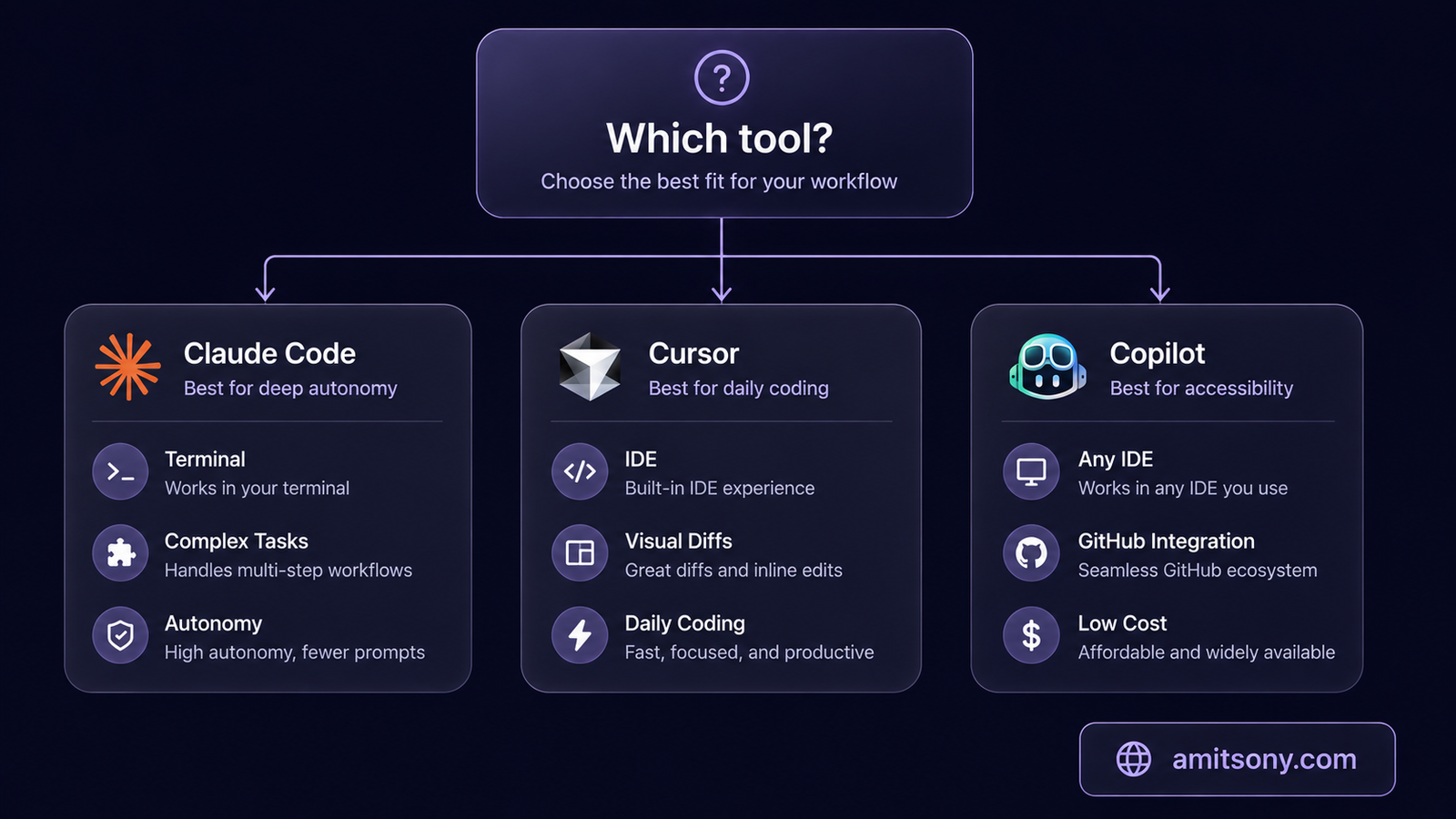
After all the benchmarks and pricing, this is what the decision actually comes down to in practice.
Choose Claude Code if you are comfortable in the terminal, work primarily on complex multi-file problems, large-scale refactors, or legacy codebase archaeology, and want the highest ceiling for autonomous execution. It is the right call for engineers doing greenfield system design, infrastructure work, or anyone who regularly thinks in terms of "give this to the AI and come back in 20 minutes." The 1 million token context window and 80.8% SWE-bench score are real differentiators at this level of work.
Choose Cursor if you want the most capable AI-native IDE experience, you are willing to switch editors, and you do regular multi-file feature development where visual diffs and fast iteration matter. Cursor is the right default for product engineers building UI-heavy applications, startups where developer velocity is everything, and individuals who want frontier model access at $20/month without the terminal learning curve.
Choose GitHub Copilot if you work in a JetBrains or non-VS-Code environment, your team is already embedded in the GitHub ecosystem, you have enterprise security or compliance requirements, or you simply want the lowest-friction and lowest-cost entry point to serious AI assistance. When new individual plan sign-ups resume — currently paused at the Pro tier since April 2026 — the free tier remains accessible to anyone wanting to evaluate it.
Use two tools together if you are a serious developer who wants maximum output. The most common professional pattern in 2026 is Cursor for daily IDE editing plus Claude Code for complex tasks — or Copilot in your existing IDE plus Claude Code in your terminal for autonomous runs. Most experienced engineers who have evaluated all three end up recommending a hybrid stack rather than a single tool.
What Are the Real Weaknesses of Each Tool?
No tool wins everywhere, and understanding the failure modes matters as much as knowing the strengths.
Claude Code's weaknesses are real. There is no visual diff UI — changes happen in the terminal, and reviewing them requires more cognitive overhead than Cursor's inline accept/reject flow. There is a genuine learning curve for developers who are not already comfortable with terminal-heavy workflows. The pricing ramps quickly: Pro at $20/month has session limits that daily heavy users will hit, pushing them toward the $100/month Max tier. And unlike Copilot, it offers no native integration with GitHub's issue or PR workflows.
Cursor's weaknesses start with the fact that it requires abandoning your current editor entirely. For developers deeply embedded in JetBrains, IntelliJ, or Visual Studio, this is a non-starter. Team pricing at $40/user/month is expensive relative to Copilot. The credit-based model introduced in 2025 means heavy users burn through their quota and face overage charges — a pattern that makes monthly costs unpredictable. And while Cursor's agents are powerful, they operate within the IDE boundary rather than at the system level.
Copilot's weaknesses in 2026 are harder to ignore than they were a year ago. The April 2026 pause on new Pro plan sign-ups created real uncertainty for developers who wanted to start with the $10/month tier. The removal of Opus models from the Pro tier means heavy users need Pro+ at $39/month for premium model access. The June 2026 switch to AI Credits billing changed how the product actually works in practice, even though plan prices stayed the same. And for pure agentic capability, Copilot's agent is meaningfully behind both Claude Code and Cursor's more advanced agent architectures.
Frequently Asked Questions
Can I use Claude Code and Cursor at the same time on the same project?
Yes, and many developers do exactly that. The standard setup is keeping both a CLAUDE.md (for Claude Code) and a .cursorrules file in the project root so each tool picks up your project conventions. Cursor handles daily editing; Claude Code handles complex autonomous tasks.
Is GitHub Copilot free in 2026?
Yes, the free tier still offers 2,000 code completions per month plus 50 agent mode requests — no credit card required. However, new sign-ups for Copilot Pro ($10/month) were temporarily paused in April 2026. Business and Enterprise plan sign-ups are unaffected.
Which tool has the best context window for large codebases?
Claude Code, by a wide margin. Its 1 million token context window went generally available in March 2026. Cursor's effective context is roughly 200,000 tokens. For most everyday features this does not matter; for large-scale refactors or onboarding to a massive legacy codebase, it is a significant advantage.
Is there a free tier for Claude Code?
No. Claude Code requires at minimum a Pro subscription at $20/month. The free Claude plan covers web, iOS, Android, and desktop chat only — the terminal-based Claude Code environment is not included. There is a Claude for Open Source program offering free Max 20x access to qualifying maintainers.
Which AI coding tool is best for teams on a budget?
GitHub Copilot Business at $19/user/month is the most cost-effective option for teams, offering solid AI assistance across all major IDEs with centralized management. Copilot Enterprise at $39/user/month (plus GitHub Enterprise Cloud costs) is the enterprise-grade choice. Cursor Business at $40/user/month is more expensive but offers deeper agent capabilities for teams doing heavy multi-file work.
Does YouTube — or any platform — penalize AI-generated code?
This question does not apply here, but for code specifically: GitHub and other platforms do not penalize AI-generated code. What matters is correctness, security, and originality of the overall codebase, not the tool used to write it.