Gemma 4 is a strong open model family from Google, released April 2026 under Apache 2.0. The E4B and 12B versions run well on 16 GB laptops, and the 26B and 31B models rival much larger models on reasoning and vision. Skip it for serious agentic coding, where Qwen 3.6 still leads.

Most local AI reviews read like spec sheets. This one asks a simpler question: is Gemma 4 worth the disk space on a normal laptop?
The verdicts below come from Google's own model card plus independent tests published since launch. Some of it is impressive. Some of it is not, and you should know which is which before you download anything.
What is Gemma 4, and what changed from Gemma 3?
Gemma 4 is Google DeepMind's fourth open model family, released on April 2, 2026. The headline change is the licence. Earlier Gemma models shipped under Google's own terms, while Gemma 4 uses plain Apache 2.0, so you can build and sell on top of it without studying a custom policy.
It comes in five sizes. E2B and E4B are the small edge models. The 12B arrived in June 2026 as a middle option. The 26B A4B is a mixture of experts model, and the 31B is the dense flagship.
Every size reads images. E2B, E4B and 12B also accept audio, though only up to 30 seconds. Context runs to 128K tokens on the small models and 256K on the rest. There is also a thinking mode, switched on with a single token in the system prompt.
Google says the 31B ranked third among open models on the Arena AI text leaderboard at launch. Treat that as a launch-day claim until you test it on your own work.
Which Gemma 4 size should you run on your laptop?
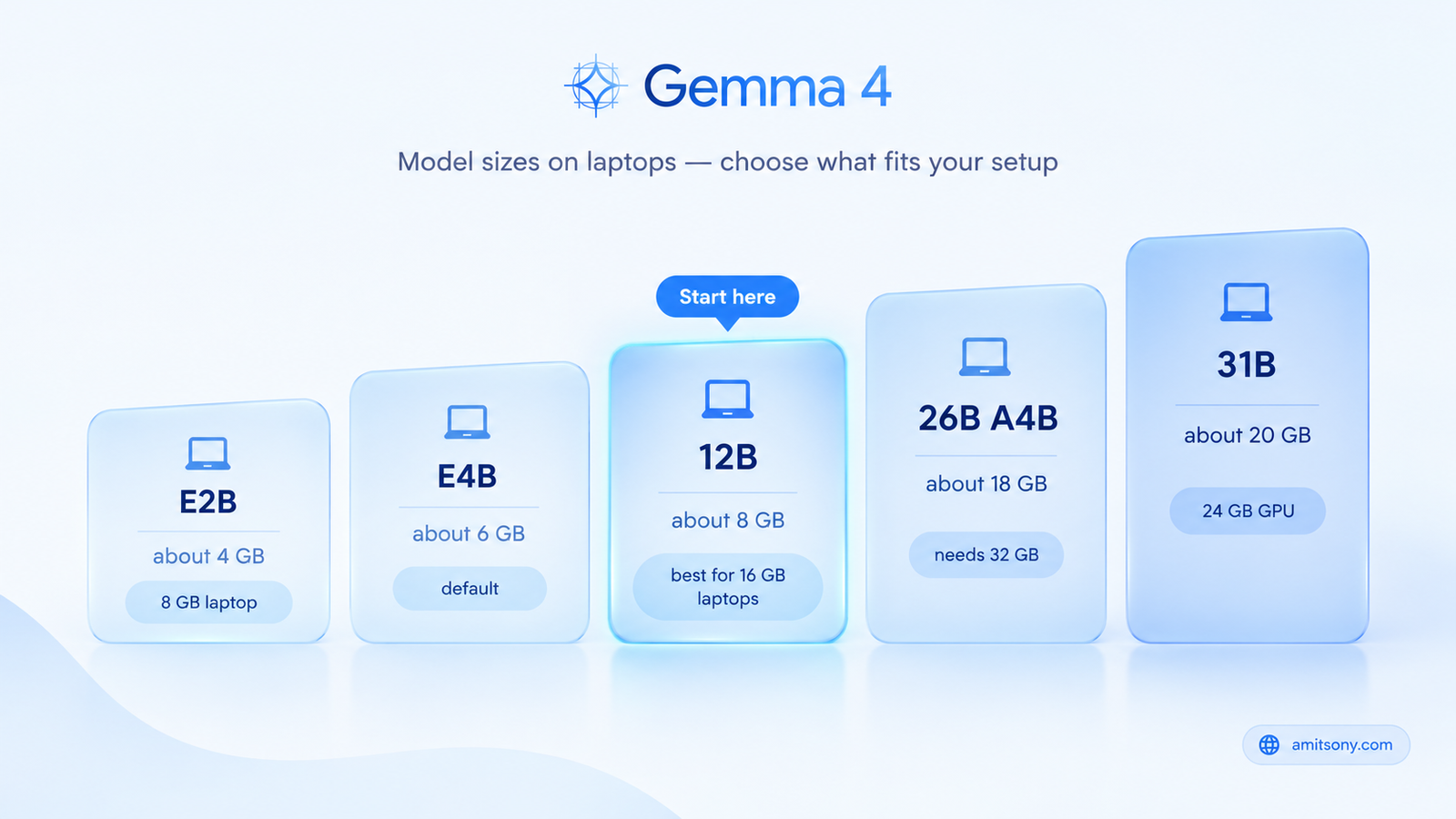
Pick the size by memory, not by ambition.
E2B needs about 4 to 5 GB. It fits an 8 GB laptop, but expect basic answers.
E4B is about 6 GB and is the default most tools pull. It is the safe first download. Its MMLU Pro score of 69.4 percent beats Gemma 3 27B at 67.6 percent, which is an odd thing to write about a model a fraction of the size.
The 12B is where I would start on a 16 GB laptop. The 4 bit file is roughly 7 to 8 GB, which leaves room for context and a browser. It scores 77.2 percent on MMLU Pro.
The 26B A4B only activates 3.8B parameters per token, so it runs far faster than a dense 26B model. It still needs 16 to 18 GB just to load, so think 32 GB of RAM. The 31B dense model needs about 19 to 20 GB at 4 bit, plus a 24 GB GPU or 32 GB of unified memory for comfort.
Here is one real number. On a 12 GB AMD gaming card, a community test measured about 57 tokens per second on E4B but only about 10.7 on the 26B, because part of it spilled into system RAM. Once a model overflows memory, speed collapses.
How do you run Gemma 4 locally, step by step?
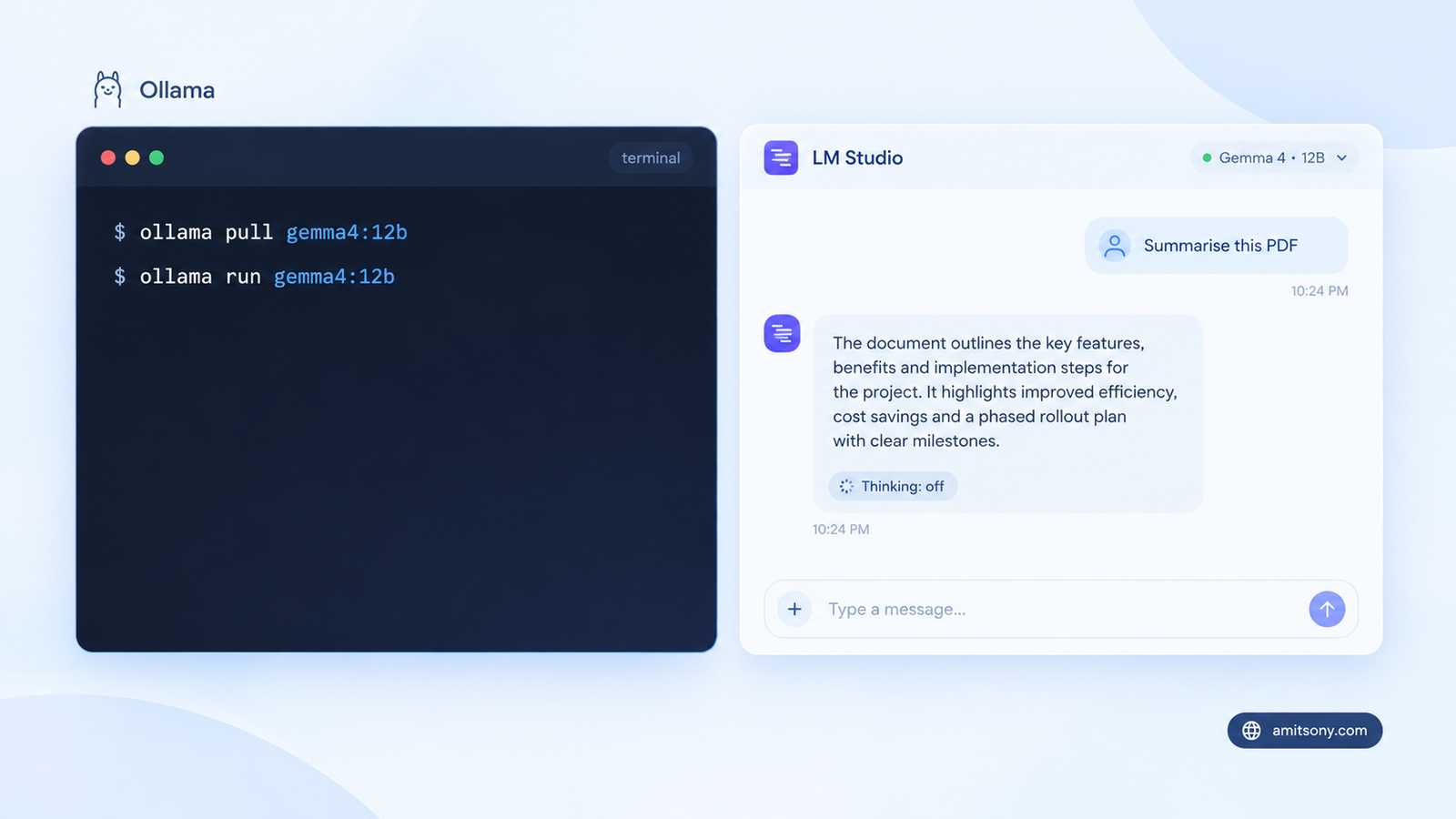
Step 1. Install Ollama and update to a current version. Older builds do not recognise the newer tags.
Step 2. Pull the size you picked.
```
ollama pull gemma4:12b
```
Step 3. Run it.
```
ollama run gemma4:12b
```
Plain gemma4 gives you E4B. The other tags are gemma4:e2b, gemma4:26b and gemma4:31b.
Prefer a point and click app? LM Studio lists Gemma 4 with ready downloads and a chat window, so no terminal is needed.
Step 4. Use Google's recommended sampling settings: temperature 1.0, top p 0.95 and top k 64. Many people lower the temperature out of habit. Leave it alone until you have a reason.
Step 5. For hard maths or logic, turn on thinking by placing the token at the start of the system prompt. Remove it for quick chat, because thinking adds latency. One more tip: put images before the text in your prompt, not after.
How good is Gemma 4 in real use?
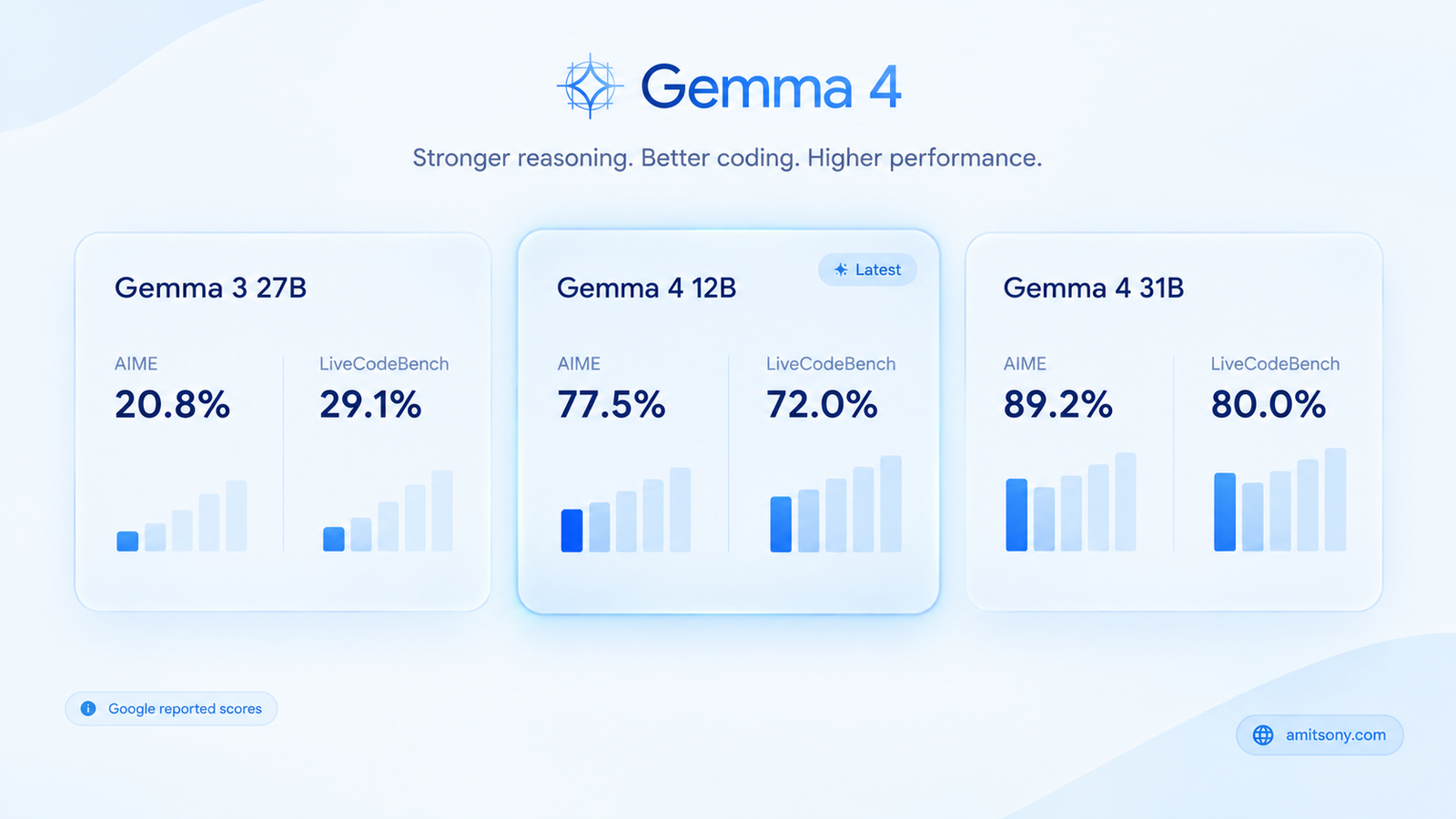
On paper, the jump from Gemma 3 is huge. Google's own numbers show the 31B at 89.2 percent on AIME 2026, 80.0 percent on LiveCodeBench v6 and 84.3 percent on GPQA Diamond. Gemma 3 27B managed 20.8 percent and 29.1 percent on the first two.
The smaller sizes hold up too. The 12B reaches 77.5 percent on AIME 2026 and 72.0 percent on LiveCodeBench. Even E4B scores 52.0 percent on LiveCodeBench, which is more than Gemma 3 27B managed.
Vision is a clear strength. The 31B scores 76.9 percent on MMMU Pro, and the model handles document parsing, charts, OCR and handwriting. For anyone who needs a local model to read scans and screenshots, this is the best reason to pick Gemma.
Remember that these are vendor benchmarks. They show direction, not your daily experience. The honest takeaway is that small Gemma models now do things that needed a far larger model a year ago.
Where does Gemma 4 fall short?
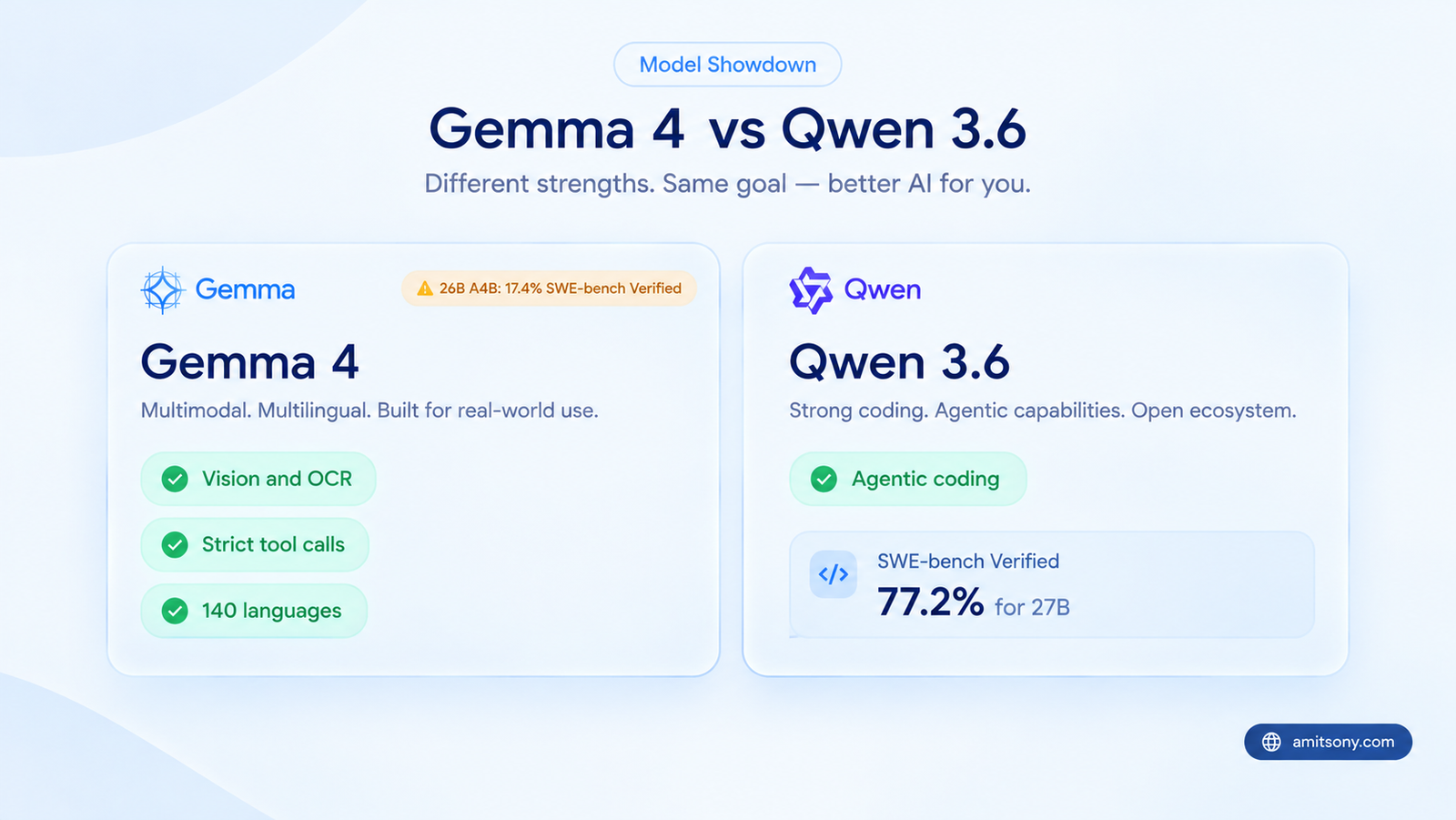
Agentic coding is the weak spot. Google left SWE-bench out of its official results, which is usually a hint. One community comparison put the 26B A4B at 17.4 percent on SWE-bench Verified against 77.2 percent for QwenQwenLM 3.6 27B, though treat that gap as indicative rather than gospel.
Hands-on tests point the same way. In a VS Code agent task, a quantised Gemma 4 produced incomplete test code while Qwen 3.6 delivered more usable output at nearly the same speed, roughly 53 against 54 tokens per second. Users have also reported the model inventing earlier conversation history during its thinking step.
Long context is another catch. On the 128K needle test, the 31B scores 66.4 percent, but the 26B drops to 44.1 percent, the 12B to 43.4 percent and E4B to 25.4 percent. A big context window does not mean the small models can use it.
It is not all bad news. A recent 24 GB GPU comparison found Gemma 4 31B the most reliable for strict, declared tool calls, and slightly ahead on vision. It also uses more VRAM and generates text more slowly than Qwen.
My verdict: skip Gemma 4 if your main job is a coding agent. Pick it for documents, images, multilingual chat and tool calls with a fixed schema.
Is Gemma 4 free for commercial use, and what does it cost to run?
Yes to the first part. Apache 2.0 allows commercial use, modification and redistribution. You still need to follow Google's prohibited use policy, but there is no custom licence to untangle.
Running it on your own laptop costs nothing per prompt beyond electricity. That is the whole appeal of a local model.
No 24 GB GPU? Rent one by the hour. RunPod lists an RTX 4090 at $0.34 per hour on Community Cloud and $0.69 per hour on Secure Cloud, which is roughly ₹30 and ₹60. That is enough to run the 31B at 4 bit. Skip Community Cloud for private documents, since the hosts are third parties.
Just want to try before you download? Google AI Studio offered the 31B and 26B models at launch, so check whether they are still listed there. Limits change often.
Who should use Gemma 4, and who should skip it?
Use it if you want a private assistant for documents, screenshots, receipts and PDFs. Use it if you need a model that works offline, or one trained on more than 140 languages. Test your own language first, because training coverage is not the same as quality.
Use the 12B if you own a 16 GB laptop and want one model that does a bit of everything. Use E2B or E4B when you need something that fits an older machine.
Skip it if you plan to run an autonomous coding agent all day. Skip the small sizes for retrieval from very long documents. And skip the 26B and 31B if your laptop cannot hold them in memory, because swapping to disk makes them painfully slow.
Frequently Asked Questions
Is Gemma 4 really open source?
The weights are released under Apache 2.0, which allows commercial use. Google shares the model weights but not the full training data.
Can Gemma 4 run on a laptop without a dedicated GPU?
The small versions run on 16 GB laptops using system or unified memory. A GPU or Apple Silicon makes them much faster.
Which Gemma 4 size is best for most people?
The 12B suits 16 GB laptops, and the 26B A4B suits machines with 32 GB of memory.
Does Gemma 4 support Hindi and other languages?
It was pre-trained on more than 140 languages, with out of the box support for over 35. Test your own language before committing.
Is Gemma 4 better than Qwen 3.6?
It depends on the job. Gemma leads on vision and strict tool calls, while Qwen is stronger for coding agents.